A new web tool called Jmail presents Jeffrey Epstein’s released email archive in a Gmail-like interface, making it easier to search, navigate and explore the documents.
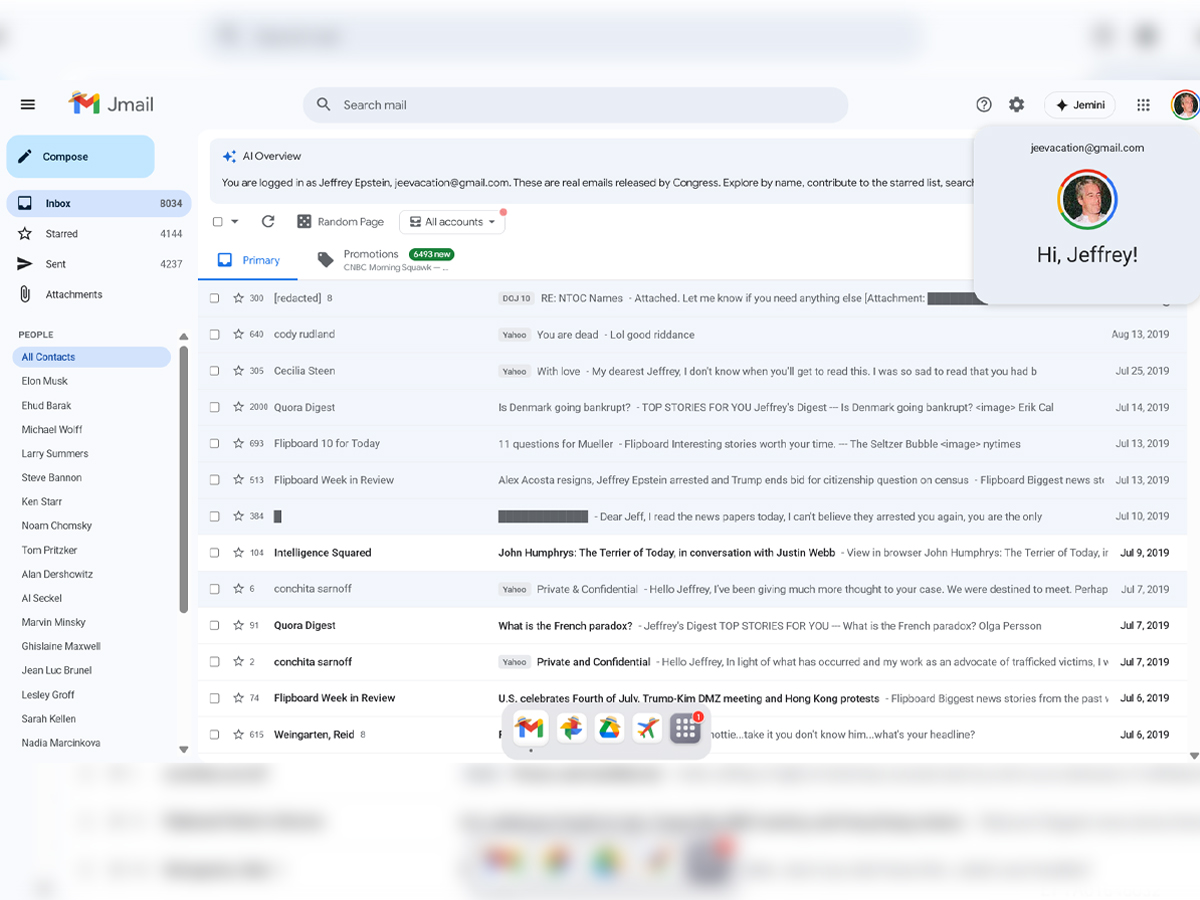
Rather than creating new data, the developers used publicly available emails already released through legal channels to compile an interface that mimics Gmail’s look and feel. (Screengrab)
A new online project is transforming the way people explore the recently released Jeffrey Epstein email archive, presenting tens of thousands of emails in a familiar Gmail-like interface rather than scattered, hard-to-read documents. The tool, called Jmail, aims to make previously released emails far more accessible and searchable, helping journalists, researchers, and the general public navigate complex records without struggling through disjointed files.
The Epstein emails were released to the public through official disclosures and court cases, and until now, the only way to read them was by combing through separate PDFs, text files, and scans. Jmail’s interface turns that sprawling archive into something that feels like a real inbox, drastically easing how people can explore the material.
The tool was developed by Riley Walz, an internet artist known for playful technical projects, and Luke Igel, a software engineer and CEO of AI video editing firm Kino. Rather than creating new data, the developers used publicly available emails already released through legal channels to compile an interface that mimics Gmail’s look and feel.
Walz described the project as a way to put information into a form people already understand. “Instead of jumping between fragmented PDFs or raw files, you can now scroll through correspondence like any other email account,” he said in a post shared on X (formerly Twitter).
the Jmail team is rapidly processing nearly a MILLION PDFs released by the government today. ten of us together right now, adding 300 GB of documents
— Riley Walz (@rtwlz) January 31, 2026
in the meantime, the raw pdfs are uploaded in JDrive: https://t.co/NyHk06rBXG https://t.co/1Tqq6bI6ZE pic.twitter.com/f72CWyA3Q2
Public releases of government or judicial documents can be difficult to sift through due to their sheer volume and fragmented format. Jmail highlights how user interface design can shape who engages with public records and how effectively they can analyze them.
Rather than simply hosting raw data dumps, Jmail reorganises emails so that patterns, relationships, and timelines become more apparent. This matters for researchers and media professionals, who can spend less time sorting files and more time focusing on substantive content.
One of the creators explained that the main challenge was not the content itself but the way it was previously presented. “The emails were just so hard to read,” Igel said, noting that much of the original material was buried in poorly scanned formats that discouraged deep investigation.
With Jmail, visitors can:
The design includes familiar features such as a sidebar for contacts, subject line previews, and even a “star” or highlight function that helps flag notable emails.
The Jmail project follows the release of thousands of Epstein emails as part of broader transparency efforts under U.S. law. Agencies, including the House Oversight Committee and the Department of Justice, have published massive quantities of material from Epstein’s estate, including emails, court records, images, and other documents, in recent months.
Those raw files, although public, were initially available only as disjointed documents with limited search functionality, a format that many found too cumbersome for meaningful research. Tools like Jmail seek to bridge that gap by organising the material in user-friendly formats.
Jmail presents the Epstein emails in a standard inbox layout, with folders such as “Inbox,” “Sent,” and search features that resemble Gmail’s interface. Users can click on individual messages, view threads, search by keywords, and scan subject lines, making it much easier to follow the flow of correspondence.
Instead of manually opening each PDF or text file, users can now browse conversations linked together, view senders and recipients, and track email threads over time. Many high-profile names show up in the archive, including media figures, academics, and public officials, but the interface simply organizes the released data for easier consultation.
The project uses optical character recognition (OCR) and AI-based text conversion tools to transform low-quality scans into readable text, boosting searchability without introducing new, private, or unreleased documents.
Although Jmail presents the emails in a format familiar to everyday users, its creators stress that the project does not introduce new or private data. It simply reorganises documents that are already available through official sources.
Some commentators have raised questions about privacy, design influence, and the ethics of recreating a Gmail-style environment for such content, but the tool remains a legal means of accessing public records rather than an exploit or breach.
